

Connect Yunxiao through its authorization confirmation window so agents can read Codeup repositories, branches, commits, and change requests.
Once Yunxiao is connected, agents can read the Codeup repositories, branches, files, commits, and change requests in your Yunxiao organization.
Connecting requires no auth config, and you do not need to prepare any credentials. After you click Connect, Yunxiao opens an authorization confirmation window, and granting authorization is all it takes.
Only one prerequisite: you are already signed in to Yunxiao in the current browser, and that account has access to the target Yunxiao organization.
A set of Codeup-related tools is generated once the connection succeeds. View them in the Available tools section of the App details page. The capabilities cover:
Click Expand below a tool to see its input parameters. Tool descriptions usually spell out ordering caveats, such as confirming the branch name before reading file contents.
You can create multiple connectors under the same Yunxiao App. To use a different account or reach a different Yunxiao organization, switch the Yunxiao sign-in state in your browser first, then click Connect new user and go through authorization again, telling them apart by connector name.
For how to manage them, see Connected accounts.
Deleting the connector in the Connector console only removes the record on this side. To fully withdraw access, also revoke the permissions of
Before you connect
Only one prerequisite: you are already signed in to Yunxiao in the current browser, and that account has access to the target Yunxiao organization.
Authorization uses the Yunxiao account you are currently signed in as. To connect with a different account, switch the Yunxiao sign-in state in your browser first.
Steps to connect
1
Start the connection
In the left-hand navigation of the console, click Apps, find the Yunxiao card, and click Connect.
2
Confirm in the authorization window
The browser opens a separate window titled Authorization confirmation, hosted at
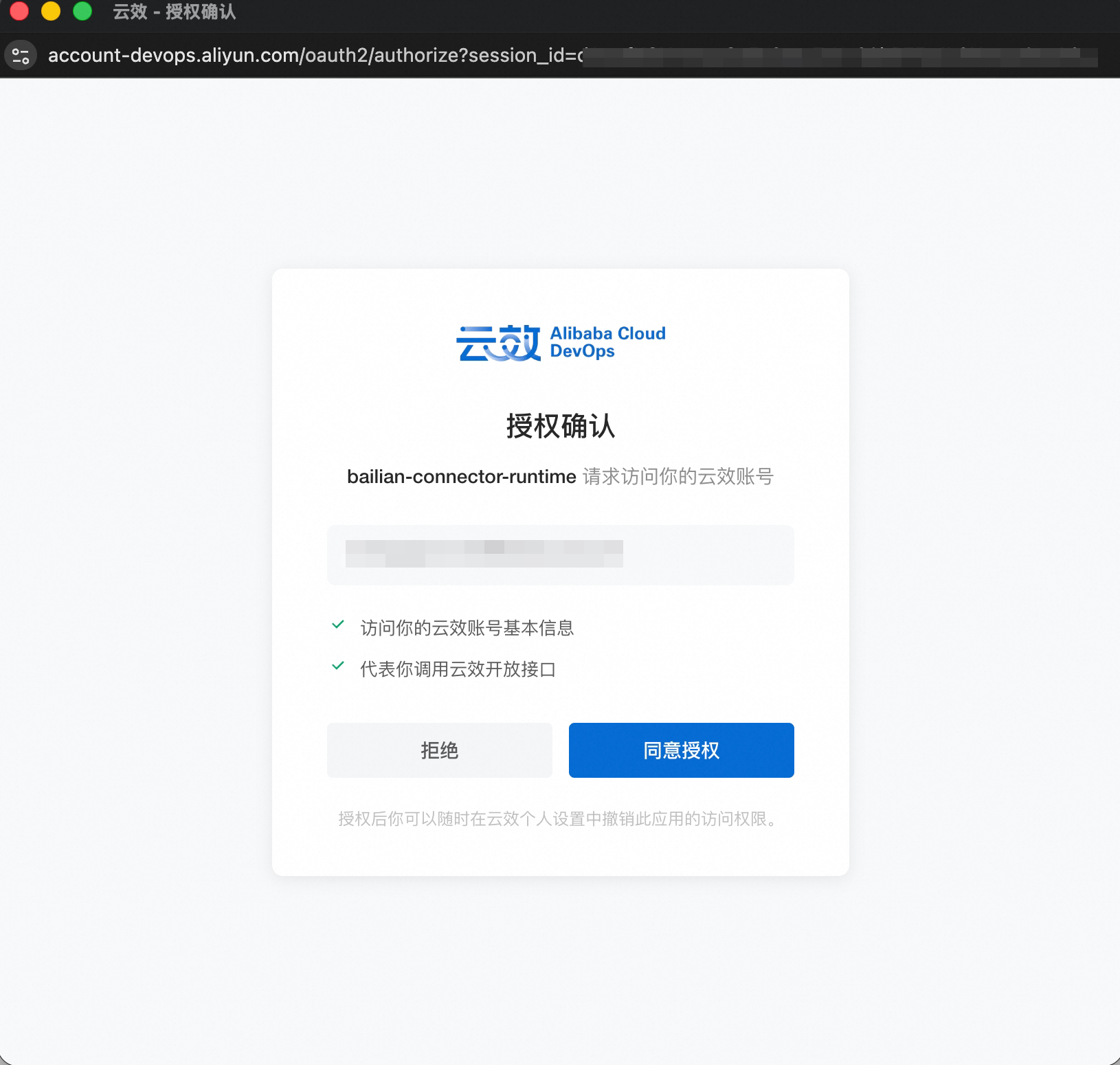
account-devops.aliyun.com.The window shows that the requester is bailian-connector-runtime, followed by your current Yunxiao account and the two permissions it requests:| Permission | What it means |
|---|---|
| Access the basic information of your Yunxiao account | Reads the account identifier to establish connector ownership |
| Call Yunxiao open APIs on your behalf | Later tool calls access Yunxiao data as you |
3
Grant authorization
Click Grant authorization. After the window closes you return to the App details page, and a new connector appears in the Connected users section with the status Connected.The connector name is generated automatically, in a form such as
YUNXIAO-9475. Click the pencil icon next to the name to rename it.Automatically generated tools
A set of Codeup-related tools is generated once the connection succeeds. View them in the Available tools section of the App details page. The capabilities cover:
| Category | What it can do |
|---|---|
| Repositories | List repositories, view repository details |
| Branches | List branches, view branch details, create a branch |
| Files | List the file tree, read file contents |
| Commits | List commits, view commit details, compare two references |
| Change requests | List and view change requests, view version lists and comments |
Multiple accounts
You can create multiple connectors under the same Yunxiao App. To use a different account or reach a different Yunxiao organization, switch the Yunxiao sign-in state in your browser first, then click Connect new user and go through authorization again, telling them apart by connector name.
For how to manage them, see Connected accounts.
Revoking authorization
Deleting the connector in the Connector console only removes the record on this side. To fully withdraw access, also revoke the permissions of bailian-connector-runtime in your Yunxiao personal settings.
The authorization window states this at the bottom as well: after granting authorization, you can revoke this application's access at any time in your Yunxiao personal settings.
Troubleshooting
| Symptom | Common cause |
|---|---|
| Nothing happens after clicking Connect | The browser blocked the pop-up. Allow pop-ups and retry |
| The authorization window says the account has no permission | The current Yunxiao account is not in the target organization, or an organization administrator restricted third-party authorization |
| The connector shows as expired | Authorization was revoked on the Yunxiao side. Go through the authorization flow again |
| Tools can list repositories but cannot read files | That account has only partial permissions on the target repository. Complete them on the Yunxiao side and retry |