

Connect MySQL, PostgreSQL, and PolarDB-X 2.0 so that agents can query business data in real time.
Database connectors let agents query business data in real time. The data stays in the original database and is not copied to the platform.
Connector supports three types of databases:
Requirements common to all three databases:
After the connection succeeds, Connector generates tools for querying the database. Expand a tool in the Available tools section of the App details page to view its actual input and output parameters.
A tool typically returns the table schema first, and the agent builds a query based on it. Naming your databases, tables, and fields clearly significantly increases the chance that the agent generates a correct query.
The data volume of the target table exceeds the check threshold. Narrow the sync or query scope, for example, select only the necessary tables, or partition large tables and restrict the time range.
The binlog-related parameters of the MySQL instance do not meet the requirements. Adjust the instance configuration item by item according to the parameters indicated in the error message, and then try again.
Internal network access has requirements on the regions of RDS and ECS instances. Before connecting, confirm that the instance region is within the supported scope. Otherwise, use Internet access instead.
A RAM user needs the corresponding permissions granted in advance by the Alibaba Cloud account before the service-linked role can be activated. Have the Alibaba Cloud account grant the missing permissions to the user in the RAM console, and then try again.
| App | Description |
|---|---|
| MySQL | Alibaba Cloud RDS MySQL or self-managed MySQL |
| PostgreSQL | Alibaba Cloud RDS PostgreSQL or self-managed PostgreSQL |
| PolarDB-X 2.0 | Alibaba Cloud PolarDB-X 2.0 distributed database |
Prerequisites
Requirements common to all three databases:
- You already have a database instance and it is reachable over the network, either over the Internet or over an internal network.
- You have registered the instance in DMS.
| App | Additional requirement |
|---|---|
| MySQL | None |
| PostgreSQL | The wal_level parameter is set to logical |
| PolarDB-X 2.0 | The region of the instance supports internal network access |
We recommend that you create a dedicated read-only database account for Connector and grant it permissions only on the databases and tables that need to be accessed.
Connection steps
1
Register the data source in DMS
First register the database instance in DMS. DMS manages all kinds of data sources in one place, and Connector reads the existing configuration from DMS, so you do not need to enter the connection string and password again in Connector.
2
Open the connection dialog
On the Apps page, find the card of the target database, for example MySQL, and click Connect.
3
Enter the basic information
| Field | Required | Description |
|---|---|---|
| Connector name | Yes | Use a name that is easy to recognize. Up to 64 characters. We recommend that you indicate the environment, for example Order DB - Production |
| Connector description | No | Describes what data the database holds and what questions it can help answer |
4
Select the data source
Under Select data source, select Import data source from DMS, and then select the data source registered in the previous step.The first time you select this option, an SLR authorization page appears and asks you to enable two service-linked roles:
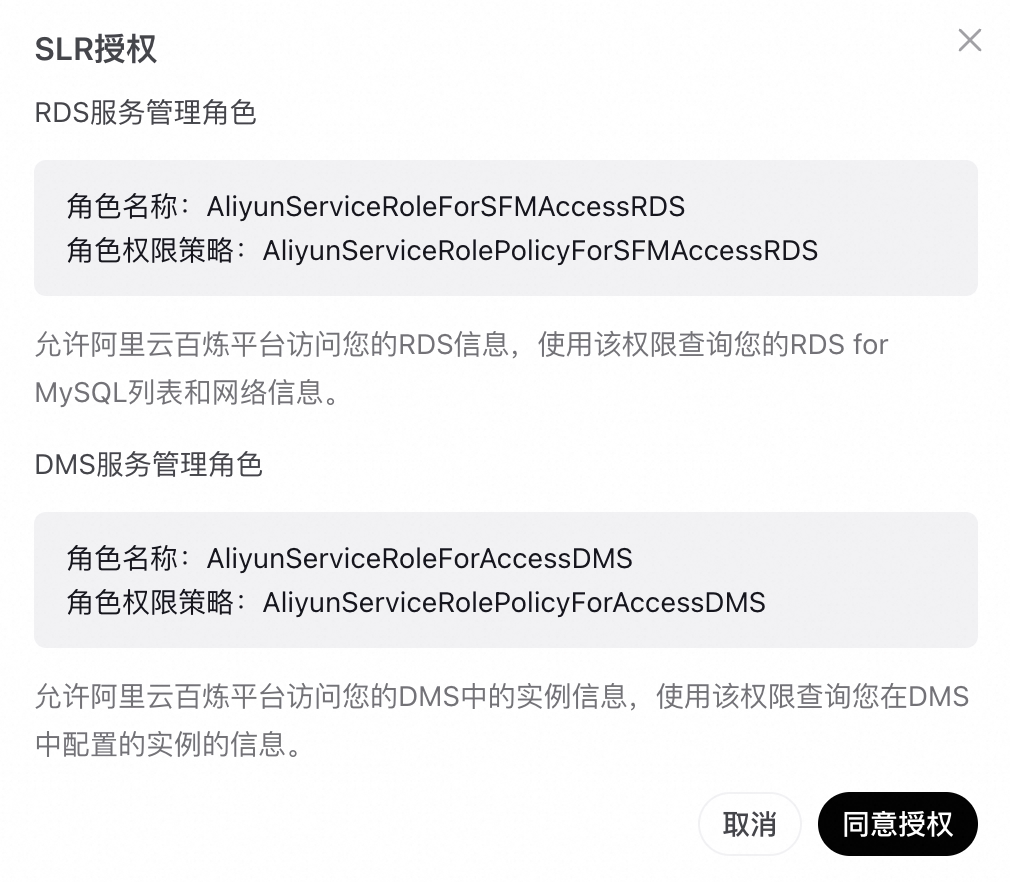 Once the roles are enabled, the page does not appear again. Return to the dialog and continue selecting the data source.
| Role | Role name | Permission policy | Purpose |
|---|---|---|---|
| RDS service management role | AliyunServiceRoleForSFMAccessRDS | AliyunServiceRolePolicyForSFMAccessRDS | Allows Alibaba Cloud Model Studio to access your RDS information and query your RDS for MySQL list and network information |
| DMS service management role | AliyunServiceRoleForAccessDMS | AliyunServiceRolePolicyForAccessDMS | Allows Alibaba Cloud Model Studio to access instance information in your DMS and query the instances you configured in DMS |
5
Select the data source
In the Select data source area, select the target instance from the DMS database list. This is required.On-screen description: select a suitable data source from the DMS database list to import. Connectivity for data sources that come from DMS is guaranteed on the DMS side, and each import supports selecting only one data source.The list is single-select and shows four columns, Instance name, Type, Instance source, and Status. The search box above it is labeled with a hint to enter an instance name to search.
If the list shows no data, the current account has no usable instance in DMS yet. Register it in DMS first, then come back and refresh.
6
Enter the database address and port
| Field | Required | Example |
|---|---|---|
| Database address | Yes | rm-b16***3i.mysql.rds.aliyuncs.com |
| Database port | Yes | 3306 |
7
Confirm creation
Click Confirm to complete the connection.
The ability to run SQL queries is supported only when the data source is imported from DMS.
Automatically generated tools
After the connection succeeds, Connector generates tools for querying the database. Expand a tool in the Available tools section of the App details page to view its actual input and output parameters.
A tool typically returns the table schema first, and the agent builds a query based on it. Naming your databases, tables, and fields clearly significantly increases the chance that the agent generates a correct query.
FAQ
A message indicates that the database configuration check failed because a table holds too much data
The data volume of the target table exceeds the check threshold. Narrow the sync or query scope, for example, select only the necessary tables, or partition large tables and restrict the time range.
CHECK_BINLOG_FORMAT, CHECK_ENFORCE_GTID_MODE, or CHECK_GTID_CONSISTENCY is reported when creating a data source
The binlog-related parameters of the MySQL instance do not meet the requirements. Adjust the instance configuration item by item according to the parameters indicated in the error message, and then try again.
Which regions support internal network data sources
Internal network access has requirements on the regions of RDS and ECS instances. Before connecting, confirm that the instance region is within the supported scope. Otherwise, use Internet access instead.
How does a RAM user activate the required service-linked role
A RAM user needs the corresponding permissions granted in advance by the Alibaba Cloud account before the service-linked role can be activated. Have the Alibaba Cloud account grant the missing permissions to the user in the RAM console, and then try again.
Differences from the Table connector
| Database connector | Table connector | |
|---|---|---|
| Data location | Stays in the original database | A copy is uploaded to the platform |
| Data freshness | Real time | A snapshot taken at import time |
| Suitable scenarios | Business data that changes continuously | One-off reports and offline ledgers |
| Preparation required | A database instance and DMS registration | No external credentials |