

Create a retrieval service to enable semantic search across multiple knowledge bases.
The Knowledge Retrieval service supports both single-knowledge-base and multi-knowledge-base retrieval, enabling precise semantic search of relevant content from your knowledge bases. You can create and configure the retrieval service via the console, then integrate it into your applications through APIs after publishing.
The following parameters apply uniformly to all bound knowledge bases:
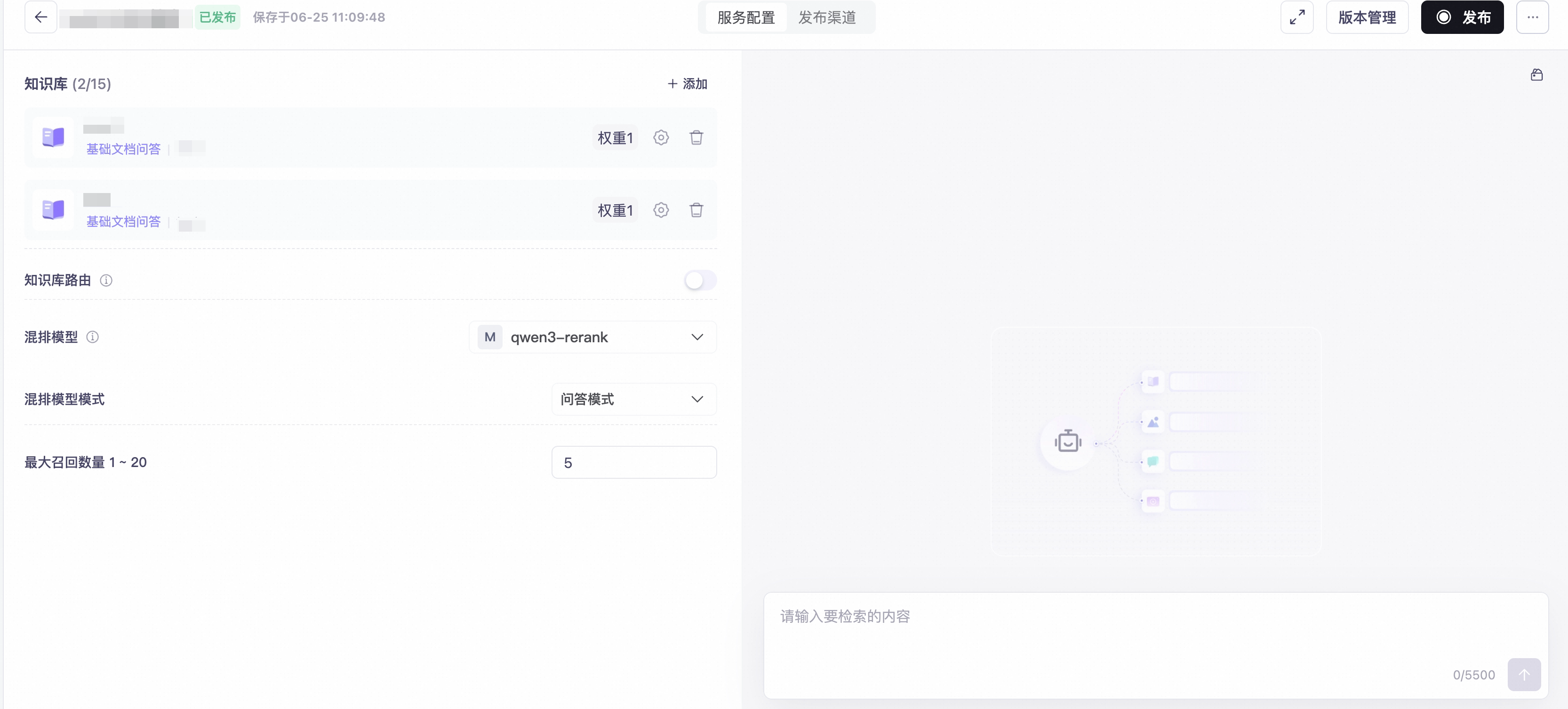 The left panel shows configuration options; the right panel provides a live debugging interface to test retrieval performance instantly.
Click the expand icon next to a knowledge base to configure its dedicated retrieval parameters:
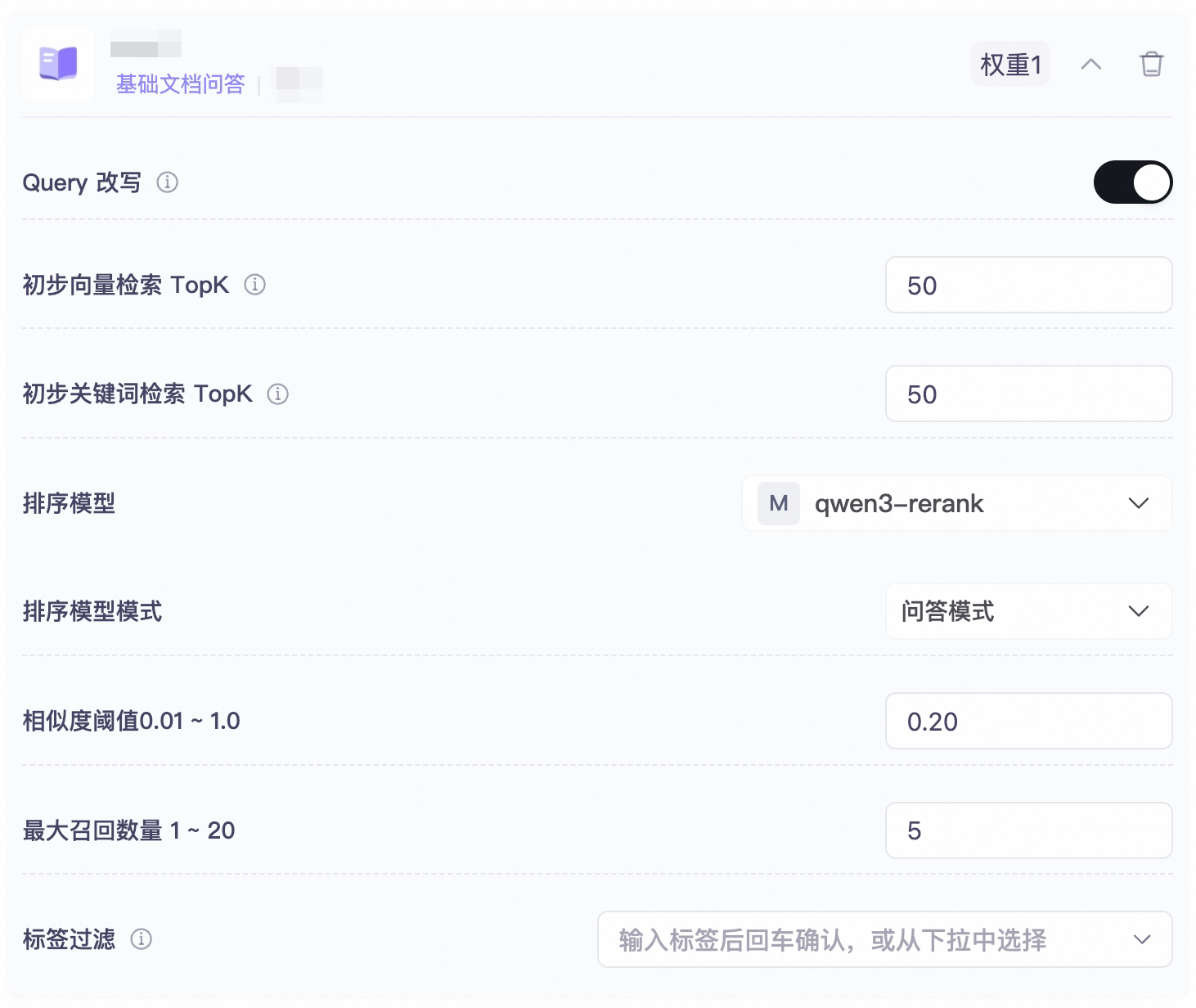 After expanding, you can configure per-knowledge-base settings such as query rewriting, recall Top-K, re-ranking model, similarity threshold, etc.
Upon receiving a query request, the Knowledge Retrieval service executes the following steps before returning results:
Call the published retrieval service using the Knowledge Retrieval API. Configure
The response's
Create a Retrieval Service
1
Navigate to the Knowledge Retrieval page
Log in to the console and go to Knowledge Services → Knowledge Retrieval.
2
Create a service
Click Create Retrieval Service in the top-right corner. In the pop-up dialog, enter:
- Service Name (required; up to 40 characters)
- Description (optional; up to 200 characters)
3
Bind knowledge bases
After successful creation, you’ll be automatically redirected to the configuration page. Click + Add, then bind one or more knowledge bases (up to 15). For each bound knowledge base, you may assign a weight — higher weights increase the priority of that knowledge base’s results in the final ranking.
4
Configure parameters
Configure global retrieval parameters (e.g., knowledge base routing, re-ranking model), as described in the Global Retrieval Configuration section below.To set independent parameters for a specific knowledge base, click the  icon on the right side of the knowledge base entry to expand its configuration panel — see Per-Knowledge-Base Configuration below.
icon on the right side of the knowledge base entry to expand its configuration panel — see Per-Knowledge-Base Configuration below.5
Test retrieval
Enter a query in the chat window on the right-hand side to view returned chunks, including similarity scores, source documents, and retrieval latency.
6
Publish
Once configuration is complete, click Publish in the top-right corner. After publishing, the retrieval service becomes available for API invocation.
- At least one knowledge base must already exist, and it must contain at least one successfully parsed document.
- For multi-knowledge-base retrieval, all involved knowledge bases must reside within the same business workspace.
Global Retrieval Configuration
The following parameters apply uniformly to all bound knowledge bases:
| Parameter | Valid Range | Description |
|---|---|---|
| Knowledge Base Routing | On / Off | When enabled, the system uses an LLM to automatically determine which knowledge bases to query based on retrieval intent — avoiding full-scan queries across all bound bases. Routing incurs LLM inference costs. |
| Re-ranking Model | qwen3-rerank / qwen3-rerank(hybrid) / qwen3-vl-rerank / No model | When enabled, applies a unified re-ranking model to sort results across all knowledge bases. When disabled, each knowledge base sorts its own results independently. Use qwen3-rerank variants for text-only knowledge bases; use qwen3-vl-rerank for multimodal knowledge bases. |
| Re-ranking Mode | Q&A Mode / Similarity Mode / Custom Advanced Mode | Q&A Mode: Ranks chunks by QA matching score — prioritizing those most likely to answer the query. Similarity Mode: Ranks by semantic similarity. Custom Advanced Mode: Enables custom intervention in the re-ranking model. |
| Max Recall Count | 1–20 | Total number of chunks returned after re-ranking. |
Per-Knowledge-Base Configuration
Click the expand icon next to a knowledge base to configure its dedicated retrieval parameters:
| Parameter | Valid Range | Description |
|---|---|---|
| Query Rewriting | On / Off | Optimizes user input queries to improve retrieval effectiveness. |
| Initial Vector Retrieval Top-K | 1–100 | Number of chunks initially retrieved during vector search. |
| Initial Keyword Retrieval Top-K | 1–100 | Number of chunks initially retrieved during keyword search. |
| Re-ranking Model | qwen3-rerank, etc. / No model | Applies a dedicated re-ranking model to this knowledge base’s retrieved results. |
| Re-ranking Mode | Q&A Mode / Similarity Mode | Q&A Mode: Ranks by QA matching score. Similarity Mode: Ranks by semantic similarity. Available only when a re-ranking model is selected. |
| Similarity Threshold | 0.01–1.0 | Filters out chunks whose final scores fall below this threshold. Higher values yield more precise but potentially less comprehensive results. |
| Max Recall Count | 1–20 | Number of chunks returned after re-ranking for this knowledge base. |
| Tag Filtering | — | Restricts retrieval scope using document tags. Type a tag and press Enter, or select from the dropdown list of existing tags. |
Retrieval Workflow
Upon receiving a query request, the Knowledge Retrieval service executes the following steps before returning results:
- Query Rewriting (optional): Optimizes the user’s input query to enhance retrieval quality.
- Vector + Keyword Retrieval: Retrieves relevant chunks simultaneously via semantic similarity (vector search) and lexical matching (keyword search).
- Re-ranking: Applies a re-ranking model to refine the order of retrieved chunks and filter out low-scoring ones.
- Result Return: Applies weighted scoring to original semantic relevance scores, then returns the final chunk list sorted by descending weighted score.
API Invocation
Call the published retrieval service using the Knowledge Retrieval API. Configure DASHSCOPE_API_KEY, replace {workspaceId} in the URL with the service's workspace ID, and replace <retrieval-service-id> in the example with the actual retrieval service ID:
data.nodes array contains matched chunks. Each result includes text, score, and metadata.
agent_id is the retrieval service ID, not a knowledge base ID. Result counts, routing, and reranking are configured and published in the service; do not pass index_id or top_k in the request. To enable reranking, select a ranking model in Global Retrieval Configuration or Per-Knowledge-Base Configuration above.