

Streaming RAG-based Q&A service powered by large language models
The Knowledge Q&A service leverages large language models combined with knowledge retrieval capabilities. It supports binding multiple knowledge bases, automatically retrieves relevant content, and generates natural-language answers. You can create and configure the Q&A service via the console and integrate it into your applications via API after publishing.
Click the  icon to the right of the retrieval mode dropdown to configure advanced retrieval parameters.
Click the expand icon on the right side of a knowledge base to configure its independent retrieval parameters:
The Knowledge Q&A service is invoked via the chat API, returning Server-Sent Events (SSE) streaming responses:
Q&A responses emit events in the following sequence:
The platform does not retain conversation state. Each request must include the full
Creating a Q&A Service
1
Navigate to the Knowledge Q&A page
Log in to the console and go to Knowledge Services → Knowledge Q&A.
2
Create a service
Click Create in the top-right corner. In the pop-up dialog, fill in:
- Service Name (required, up to 40 characters)
- Description (optional, up to 200 characters)
3
Configure model and prompt
After successful creation, you’ll be redirected to the configuration page:
- Model: Select the large language model used to generate answers (e.g., qwen3.6-plus). Click the
 icon next to the model to configure parameters such as
 temperatureandenable_thinking. - Prompt (optional, up to 500 characters): Guides the model’s response style and behavior.
4
Select retrieval mode
Choose a retrieval strategy — see Retrieval Modes below.
5
Bind knowledge bases
Click + Add, then bind one or more knowledge bases (up to 15). When enabling the Priority toggle, each bound knowledge base displays a priority selector where you can assign High / Medium / Low priority for retrieval ranking.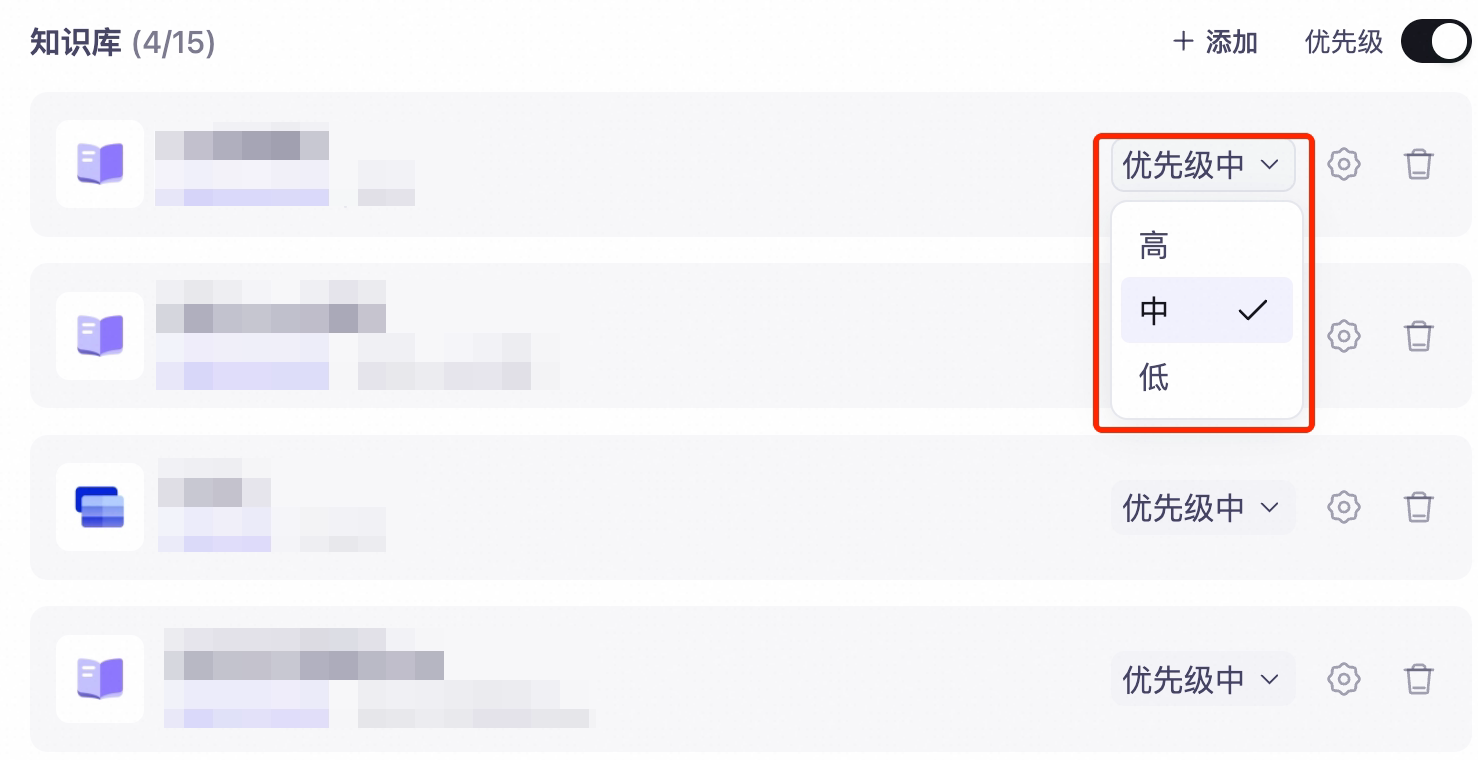 To configure independent parameters for a single knowledge base, click the expand icon on its right side to reveal its dedicated configuration panel — see Independent Knowledge Base Configuration below.
6
Configure generation controls
Enable generation control options as needed — e.g., file pre-parsing, refusal-to-answer, leakage prevention — see Generation Control Parameters below.
7
Test Q&A
Enter questions in the debug pane on the right to view generated answers, cited sources, and the full retrieval process. File uploads are supported if file pre-parsing is enabled.
8
Publish
Once configured, click Publish in the top-right corner. The Q&A service becomes callable via API after publishing.
- At least one knowledge base must already exist, and it must contain at least one successfully parsed document.
- For multi-knowledge-base joint Q&A, all bound knowledge bases must reside within the same business workspace.
Retrieval Modes
| Mode | How It Works | Use Cases |
|---|---|---|
| Ultra-Fast | Performs single-round retrieval and directly generates an answer; supports toggling query rewriting | Simple, well-defined questions; latency-sensitive scenarios |
| Multi-Round Intelligent Retrieval | Uses LLM-powered agentic planning to iteratively perform intent recognition, query rewriting, and knowledge-base routing; supports configuring maximum ReAct rounds | Complex or ambiguous questions; cross-knowledge-base synthesis required |
icon to the right of the retrieval mode dropdown to configure advanced retrieval parameters.
Independent Knowledge Base Configuration
Click the expand icon on the right side of a knowledge base to configure its independent retrieval parameters:
| Parameter | Valid Range | Description |
|---|---|---|
| Query Rewriting | On / Off | Optimizes user input to improve retrieval quality. Controlled by this toggle in Ultra-Fast mode; automatically handled by the agent in Multi-Round Intelligent Retrieval mode. |
| Initial Vector Retrieval TopK | 1–100 | Number of chunks initially retrieved during vector search. |
| Initial Keyword Retrieval TopK | 1–100 | Number of chunks initially retrieved during keyword search. |
| Reranking Model | e.g., qwen3-rerank / None | Applies independent reranking to retrieval results from this knowledge base. Use qwen3-rerank series for text-only knowledge bases; use qwen3-vl-rerank for multimodal knowledge bases. |
| Reranking Mode | QA Mode / Similarity Mode | QA Mode ranks by question-answer relevance; Similarity Mode ranks by semantic similarity. Available only when a reranking model is selected. |
| Similarity Threshold | 0.01–1.0 | Filters out chunks whose scores fall below this threshold after reranking. Higher values yield more precise but potentially incomplete results. |
| Max Retrieved Chunks | 1–20 | Number of top-ranked chunks returned per knowledge base after reranking. |
| Tag Filtering | — | Restricts retrieval scope using document tags. Type a tag and press Enter, or select from the dropdown list of existing tags. |
Available parameters vary by knowledge base type. Document-search-type knowledge bases display all parameters; multimodal types (e.g., image Q&A) omit Query Rewriting and TopK parameters.
Generation Control Parameters
| Parameter | Description |
|---|---|
| File Pre-Parsing | When enabled, allows uploading files (including images and documents) via the attachment button in the debug pane. Offers two parsing modes: Full-text Citation, which parses entire content as context; and Chunk-Based Retrieval, which slices uploaded files and integrates them with knowledge-base retrieval. |
| Refusal-to-Answer | When enabled, the model refuses to answer if retrieved evidence is insufficient, returning a custom refusal message instead. |
| Leakage Prevention | When enabled, prevents verbatim leakage of source content from knowledge bases. Triggers a custom protective response upon detecting potential leakage. |
| Multimodal Response | When enabled, includes multimodal content (e.g., images) from knowledge bases in model responses. |
| Citation | When enabled, displays source citations in model responses, indicating which document each part of the answer originates from. |
API Invocation
The Knowledge Q&A service is invoked via the chat API, returning Server-Sent Events (SSE) streaming responses:
SSE Event Types
Q&A responses emit events in the following sequence:
| Event | Description |
|---|---|
plan_start → planning → plan_end | Planning phase: the model plans retrieval and response strategies. |
tool_calling → tool_return | Tool-calling phase: tool_calling triggers a retrieval request; tool_return returns matched chunks. |
generation_start → generating → generation_end | Generation phase: final answer is streamed incrementally; finish_reason equals "stop" in generation_end. |
In Multi-Round Intelligent Retrieval mode, the entire
plan → tool_calling → tool_return cycle may repeat multiple times. Full event documentation is available in the chat API reference.Multi-Turn Conversations
The platform does not retain conversation state. Each request must include the full messages history. Best practices include:
- Limiting history length (e.g., last 10 turns) to avoid exceeding model context windows.
- Using only the most recent user message for retrieval to reduce noise.